Work Order Setup: Adding Resources, Costs, & Dispatches
Last updated: November 11, 2026
Some jobs have more complex tasks that need to be broken into multiple jobs completed by different trades. This article explains the optional items you can add to a work order depending on the complexity of the work.
Work order options
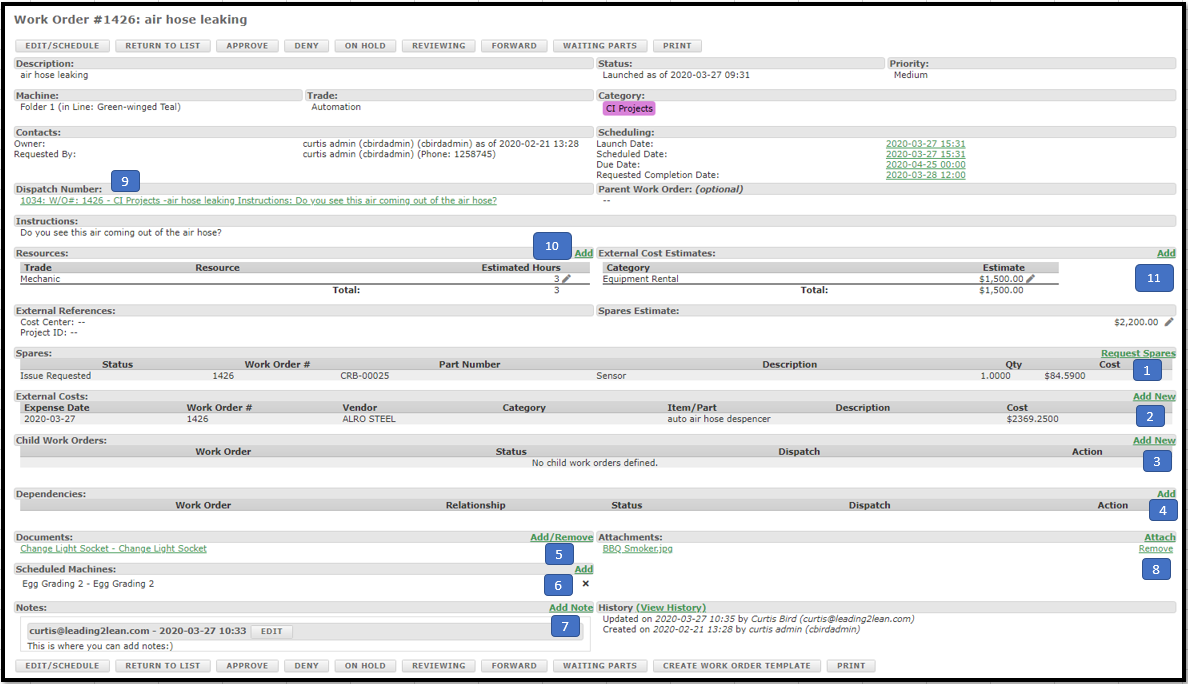
Request Spares: Add spare parts needed for the job.
Add External Costs: Vendors, equipment rentals, or travel needed to perform the job.
Add Child Work Orders: Additional work orders that break the job into smaller sections, for example by different trades.
Add Dependencies to child work orders: Require some jobs to be scheduled before others. Used when scheduling multiple child work orders. (Only visible in the Project Management Module.)
Add Documents: Documents from the Standard Work/Documents module.
Add Scheduled Machines: Equipment used to complete the job, such as a welder and a crane. (Only visible in the Project Management Module.)
Add Notes: Add notes throughout the work as needed.
Add Attachments: Photos, sketches, or anything else that helps with the job.
Launch a Work Order into a Dispatch: Overrides the Launch Date and creates the dispatch immediately when you select the launch button.
Add Resources, Trades and Estimated Hours: You can set any of the three at any time.
Add external estimated costs: For items like rental equipment; these roll up into the cost estimates.
A. The cost summary section compares all entered costs to estimated costs.
Parent work orders
If a new work order needs to be associated with an existing work order, find and select it in the Parent work order field when editing the work order.
Link multiple dispatches to a single work order
Note: A site setting must be enabled by L2L Support for this feature.
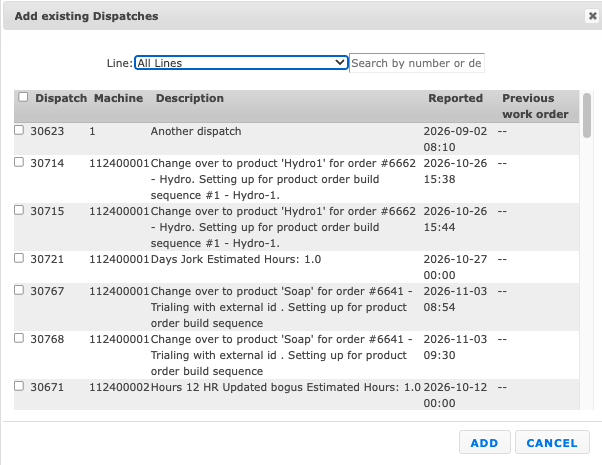
Once enabled, a Dispatch section appears within the work order where you can add (link) existing dispatches or create new dispatches directly from the work order. Linked dispatches can also be removed from the work order.

When linking existing dispatches, you can filter by Line(s) and search by number or description. Select multiple dispatches using the checkboxes.