Work Orders: Scheduling a Work Order
Last updated: November 11, 2026
This article shows you how to schedule a simple work order and explains how automatically launched work orders behave.
A simple work order has a single job that can be completed by one trade.
Example: A broken sprinkler needs to be repaired. This can be a single (simple) work order completed by the assigned maintenance person, and it can be scheduled in a few steps.
How to schedule a simple work order
From the main work order screen, click the work order you want to schedule.

Select the Edit/Schedule button.

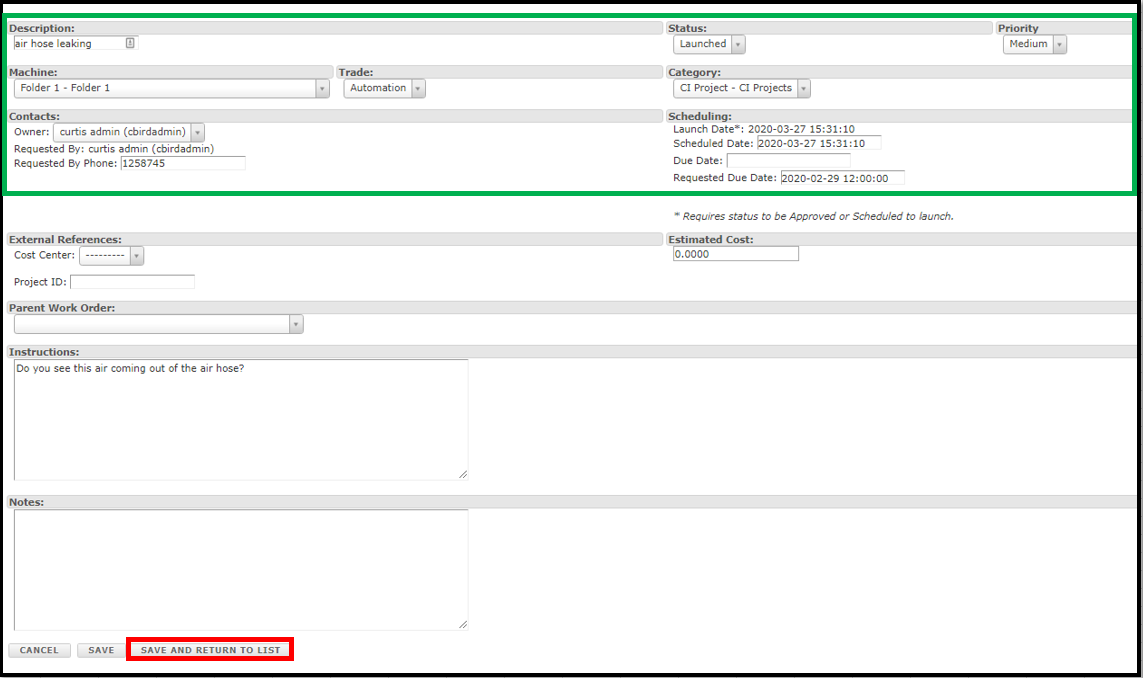
Verify the top information is correct, such as Trade and Priority.
Schedule the dates for the work. Review the requested date to see if you can meet the requester's timing (this may not always be possible).
Launch Date: The date you want the work order to launch onto the dispatch screen.
Scheduled Date: If needed, the date and time the area will be available for the job. Example: the production line may be scheduled down at a certain time.
Due Date: When the job needs to be completed by.
Select Save and return to the main list.
This is the minimum needed to schedule a simple job. To add cost estimates, resources, or child work orders, see the related Work Orders articles on cost and resource planning and on managing complex jobs.
Automatically launched work orders
Important: When work orders launch automatically based on the Launch Date, the system sets Submitted By to WorkOrder Launcher rather than the work order owner. These dispatches will not appear under the My Dispatches filter in the Dispatch module, because that filter only shows dispatches you've submitted yourself. To view and organize automatically launched work order dispatches, create saved filters for those dispatch types.
Recurring work
Note: Work Orders do not support automatic recurrence. For recurring tasks, create separate Work Orders for each occurrence and schedule them manually using tools like the Work Order Resource Maintenance Planner.